
Your Pixelfed photos and albums, scheduled on any server
Schedchie is a Pixelfed scheduler for social media managers and agencies: up to 15 Pixelfed accounts and no post limits for €9.99 a month, flat, on one calendar with 19 other platforms.
Type your server’s address, like pixelfed.social, and approve Schedchie on that server’s own page. Schedchie never sees your password. Photos and albums, and video where your server takes it, with alt text on each file and the caption counted against your server’s own limit.
14-day free trialCancel anytime, no questions asked

What you can schedule on Pixelfed
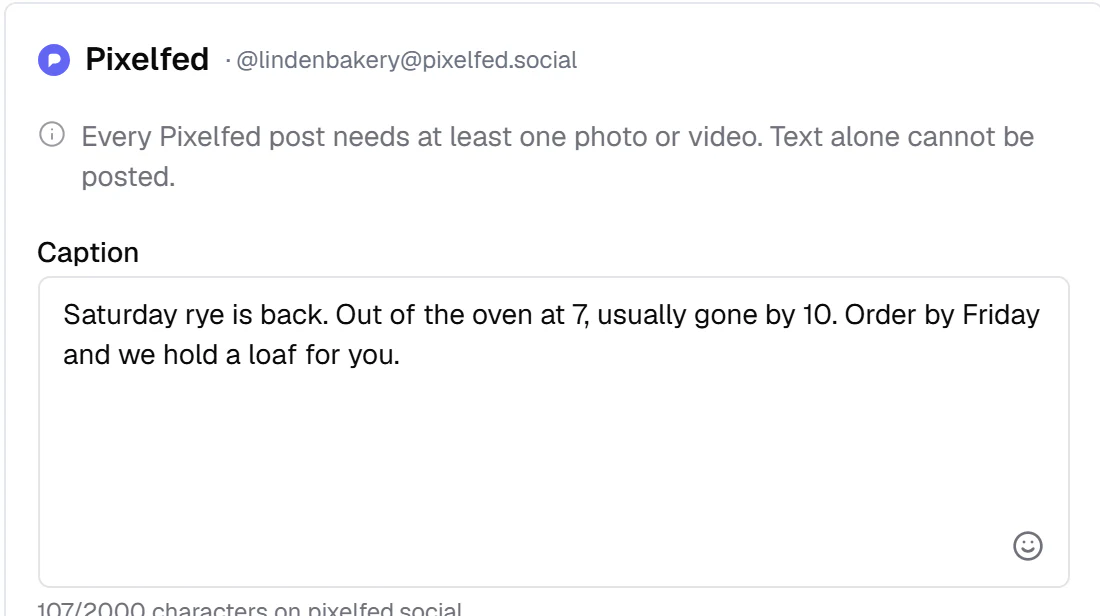
2,000 characters a caption on pixelfed.social, and on any other server the limit it sets, read when you connect
- Photo posts
- One photo with its caption and alt text
- Albums
- Several photos in one post, up to your server’s limit: 20 on pixelfed.social, 4 on a server that keeps Pixelfed’s default
- Video
- Where your server accepts it, as pixelfed.social does
- Who can see it
- Public, unlisted, or followers only, picked per post
How Schedchie handles Pixelfed
- Any Pixelfed server
- Schedchie registers itself with your server the first time someone connects there. No allowlist, no waiting to be added.
- Your password stays with your server
- You approve Schedchie on your server’s own page, and the access it gives renews on its own. You can remove Schedchie any time under Settings, Applications on your server.
- Your server’s own limits
- The caption length, the number of files, and the file types and sizes your server takes are read when you connect (on pixelfed.social: 2,000 characters, 20 files, 15 MB a file). Every post is checked against them before it is scheduled.
- Every post needs a photo or a video
- Pixelfed refuses a post without one, so the composer tells you before you schedule, not after it fails.
- Alt text on every file
- Write a description for each photo or video in the post, up to 1,000 characters.
- Sensitive media
- Mark a post sensitive and add a warning of up to 140 characters. The photos show blurred behind it.
- Comments on or off
- Turn comments off on a post that should not get any.
- Never posted twice
- If the connection drops after a post was sent, Schedchie looks for it on your profile instead of sending it again.
Your photos in the same batch
Pixelfed goes in the same weekly batch as the rest: the same photos, a caption per account where you want one, and the times set once. Connecting takes a server address and one approval on your server.
Pixelfed posting record
Each post shows whether it published, with a link to it on your Pixelfed server.
Pixelfed is included in the flat €9.99 plan: up to 15 accounts, no post limits. Ultra (€24.99) covers unlimited accounts.
from €4.99
See pricingConnecting PixelfedPixelfed limitsSchedule Pixelfed photo posts from an AI assistant
Pixelfed questions
Which Pixelfed servers work?
Any of them. Type your server’s address when you connect, like pixelfed.social, and Schedchie registers itself with that server. A server that has turned off sign-in for apps cannot be connected, and Schedchie tells you so.
Where do I sign in to connect Pixelfed?
On your own server’s page, where you approve Schedchie, so it never sees your password. The access your server gives Schedchie renews on its own, and you can remove it under Settings, Applications on your server.
Can I post to Pixelfed without a photo?
No. Pixelfed refuses a post without a photo or a video, so every Pixelfed post needs at least one. The composer tells you before the post is scheduled.
Does Pixelfed take video?
Where your server accepts it, as pixelfed.social does. If your server takes photos only, Schedchie tells you before the post is scheduled.
How many photos can an album have?
As many as your server allows: 20 on pixelfed.social, 4 on a server that keeps Pixelfed’s default. Schedchie reads the number when you connect and never drops photos to make a post fit.
Who can see the post?
You pick per post: public, unlisted or followers only. A private profile on Pixelfed keeps its posts to followers whatever you pick.
How many accounts can I connect?
Each Pixelfed account is one connection, on any server. Pro (€9.99 a month) covers up to 15, Ultra (€24.99 a month) unlimited (fair use: 50 on any one platform, raised free on request), with no per-account fees.
Can I schedule Pixelfed with my other platforms in one place?
Yes. Schedchie is one social media scheduler for 20 platforms: Instagram, Facebook, TikTok, LinkedIn, Pinterest, YouTube, Threads, Bluesky, Mastodon, Telegram, Google Business Profile, Discord, Slack, WordPress, Dev.to, Hashnode, Ghost, Pixelfed, Listmonk and X (posting to X is paid in X credits, from €4.99). Pro is €9.99 a month for up to 15 accounts on each, 300 in all, with no post limits.
Can I schedule Pixelfed photo posts from ChatGPT or Claude?
Yes, on every plan from €9.99, trial included. Point Claude, ChatGPT, Cursor or VS Code at mcp.schedchie.com and sign in on Schedchie's own page; your assistant can schedule, edit and retry Pixelfed photo posts. Claude gets up to 88 tools, ChatGPT a core set of 14 (scheduling from ChatGPT needs its Business, Enterprise or Edu plan).
Schedule Pixelfed with no per-post charge
Start free trial14-day free trialCancel anytime, no questions asked
Compare
- Schedchie vs Buffer
- Schedchie vs Hootsuite
- Schedchie vs Later
- Schedchie vs Metricool
- Schedchie vs Typefully
- Schedchie vs Postiz
- Buffer-Alternative (DE)
- Hootsuite-Alternative (DE)
- Later-Alternative (DE)
- Postiz-Alternative (DE)
- All alternatives
- The cheapest social media scheduler
- The best social media scheduler
- The AI social media scheduler
Platforms
- Instagram scheduler
- Facebook scheduler
- TikTok scheduler
- LinkedIn scheduler
- Pinterest scheduler
- YouTube scheduler
- Threads scheduler
- Bluesky scheduler
- Mastodon scheduler
- Telegram scheduler
- Google Business Profile scheduler
- Discord scheduler
- Dev.to scheduler
- Hashnode scheduler
- Slack scheduler
- WordPress scheduler
- Listmonk scheduler
- Ghost scheduler
- X (Twitter) scheduler