


Social media management is the process of creating, scheduling, and publishing content across social networks, engaging with your audience, and analyzing the results — usually from one central tool. With more than 5.4 billion people using social media in 2026 and average daily usage still above two hours, your company’s social presence directly influences public perception, customer loyalty, and sales. In this guide (updated July 2026), we’ll explore what social media management entails, why it matters, the typical tasks involved, how to craft a strategy, and — because it’s the question most readers arrive with — which social media management tools are actually worth paying for in 2026, with a current price comparison.

What Is Social Media Management?
Definition: Social media management is the ongoing process of managing and optimizing a brand’s presence on social media platforms. It involves creating content, scheduling posts, engaging with followers, and analyzing performance across networks like Facebook, Instagram, X (Twitter), LinkedIn, TikTok, and more. In simpler terms, it’s how businesses strategically maintain their online presence on social channels to grow and engage their audience.
Key Components: Social media management isn’t just occasional posting. It encompasses a wide range of activities and responsibilities, such as:
Content Strategy and Creation: Planning what to post (images, videos, articles, etc.) and crafting engaging content that aligns with your brand’s voice and goals.
Scheduling and Publishing: Timing posts for when your audience is most active, often using a content calendar to maintain a consistent posting schedule.
Community Engagement: Monitoring comments, messages, and mentions, and responding to followers to build relationships. This includes handling customer inquiries or complaints via social channels promptly and professionally.
Social Listening & Reputation Management: Keeping an eye on what people are saying about your brand (and industry) on social media. This involves tracking mentions and keywords, responding to feedback, and managing your brand’s reputation online.
Paid Advertising and Promotions: (Optional) Planning and running targeted social media ad campaigns to reach a larger or more specific audience. This might include boosting posts or creating ads on platforms to support your marketing goals.
Collaboration & Team Coordination: If you have a team, it involves coordinating roles and workflows (like who creates content, who responds to messages, etc.), and possibly working with influencers or partners to expand reach.
Analytics and Reporting: Collecting data on your social media performance (followers, likes, shares, clicks, etc.), and reporting on these metrics to understand what’s working and guide future strategy.
Social media management can be handled by a dedicated social media manager, a team, or even an owner or employee in a small business. Regardless of who does it, the goal is to keep your social profiles active, engaging, and aligned with your business objectives.

Why Is Social Media Management Important for Businesses?
In today’s digital landscape, social media is often the first place people encounter your brand. Here are a few reasons why effective social media management is so important for businesses:
Huge Audience Reach: Social platforms give you access to a vast audience. Millions (and collectively, billions) of people log into social media daily. A strong presence means you can reach potential customers where they already spend their time. If your business isn’t visible on social media, you risk losing attention to competitors who are active there.
Builds Brand Awareness and Reputation: Consistent posting and engagement help keep your brand on people’s minds. By sharing valuable content and positive updates, you increase awareness of your products or services. Moreover, how you interact with followers (for example, responding helpfully to questions or resolving issues) directly impacts your brand’s reputation. A well-managed social profile signals that your company is active, responsive, and cares about its audience.
Community Engagement and Loyalty: Social media allows two-way communication with customers. When you reply to comments, acknowledge feedback, and join conversations, it fosters a sense of community. Engaging with users makes them feel heard and valued, which can lead to stronger customer loyalty. Over time, a loyal social media following can become brand advocates who recommend your business to others.
Customer Service and Support: Many people now turn to social networks to ask questions or seek help from companies. Effective social media management ensures that customer inquiries or complaints are addressed quickly on these platforms. This real-time support not only helps the individual customer but also shows others that your business is attentive and customer-focused.
Insights into Your Market: Being active on social media gives you a front-row seat to what your target audience is talking about, what they like or dislike, and even what they think about your competition. By managing your social presence, you can gather valuable insights — for example, which posts get the most engagement, or what common questions people have about your product. These insights can inform everything from product improvements to marketing strategies.
Competitive Advantage: If your competitors are engaging audiences on social media and you’re not, you may fall behind. Conversely, managing social media well can help you stand out. A small business with an excellent social media presence can appear more approachable and modern than a larger competitor who ignores social channels. In short, active social management helps you stay competitive in your industry.
Supports Overall Business Goals: Whether your goal is to increase sales, drive traffic to your website, or build brand recognition, social media can play a big role. It’s a versatile channel for marketing campaigns, promotions, and storytelling. When managed strategically, social media can directly contribute to business objectives — for instance, by generating leads, increasing online store visits, or launching a viral campaign that puts your brand in the spotlight.
In summary, social media management is important because a strong online presence leads to better community engagement, improved brand reputation, and greater brand awareness and loyalty for companies. It ensures you’re part of relevant conversations and helps turn social interactions into positive business outcomes.

Common Social Media Management Tasks and Workflows
Managing social media involves a mix of creative, strategic, and analytical tasks. Especially for beginners, it’s helpful to understand what day-to-day social media management looks like. Here are some of the common tasks and workflows you’ll handle:
Planning a Content Calendar: Successful social media management starts with planning. You’ll brainstorm and map out upcoming content — for example, scheduling posts around holidays, product launches, or marketing campaigns. A content calendar helps you visualize what will be posted and when, ensuring you maintain a consistent presence.
Content Creation and Curation: This is one of the core activities. It involves creating original posts (writing captions, designing images or videos, etc.) as well as curating relevant content from other sources (such as sharing an interesting article or reposting user-generated content). Creativity and branding are key here: the content should be engaging and aligned with your brand’s voice and style.
Scheduling and Publishing Posts: Rather than manually posting in real time every day, social media managers typically schedule content in advance. Using scheduling tools or the platforms’ native schedulers, you queue up posts to publish at optimal times (when your audience is most likely online). This workflow might involve logging into a social media management tool, uploading your content, and setting dates/times for each post on each platform.
Engaging with the Community: After content is published, another ongoing task is community management. This means monitoring each platform for new comments, messages (DMs), mentions, and even reviews. You’ll respond to comments (thanking people, answering questions), reply to direct messages from customers, and join conversations where your brand is tagged or relevant. Engaging promptly and authentically is crucial to show that there’s a real, caring human (or team) behind the account.
Social Listening and Monitoring: Beyond direct interactions, social media management includes keeping tabs on the broader social conversation. You might use specific tools or built-in platform features to track mentions of your brand name, hashtags related to your industry, or keywords relevant to your business. This “listening” helps you catch opportunities (like someone looking for a product recommendation you could fill) and manage your reputation by addressing any negative mentions or misconceptions. It also keeps you informed about trending topics or competitor activity.
Running Campaigns and Promotions: Often, social media isn’t just about day-to-day posts — you’ll run larger campaigns too. This could be a contest, a hashtag challenge, a themed series of posts, or a paid advertising campaign. Managing a campaign involves coordinating multiple posts across days or weeks, possibly across multiple channels, with a unifying goal (e.g. increasing sign-ups or launching a new feature). It requires more strategic planning and monitoring to adjust tactics based on response.
Paid Advertising Management: If you choose to use paid social ads, managing these is another task. This includes creating ad content, setting targeting parameters (like which audience demographics or interests to reach), budgeting, and monitoring ad performance. Paid campaigns often run alongside organic (non-paid) posts, and a manager needs to oversee both and ensure they complement each other.
Analytics and Reporting: A significant part of social media management happens behind the scenes: tracking metrics and analyzing results. Typically, you’ll review data regularly (weekly or monthly) to see how your posts and campaigns are performing. This involves looking at things like follower growth, post reach (how many people saw it), engagement (likes, comments, shares), click-throughs to your website, and conversion metrics (like sign-ups or sales attributed to social traffic). Based on this data, you generate reports that summarize the results for your team or clients. More importantly, you use the insights to refine your content strategy and posting schedule going forward. For instance, if you notice that videos get twice as much engagement as images, you might shift your content mix more towards video.
These tasks often occur in a continuous cycle. For example, you plan content, schedule posts, engage with the community as content goes live, monitor what’s happening, adjust future plans based on feedback and analytics, and then plan the next round of content. Workflow is about creating an efficient routine: some social media managers like to batch tasks (e.g., creating all visuals for the week in one go, or setting aside specific times of day to reply to comments) to stay organized and save time.
Tip for Beginners: It might seem like a lot, but you can start simple. Begin with a manageable number of platforms and content schedule, then gradually expand. Using the right tools (as we’ll discuss later) can significantly streamline these workflows by allowing you to handle scheduling, monitoring, and analytics all in one place.

Benefits of Effective Social Media Management
Investing time and effort into social media management can pay off greatly. Here are some of the key benefits businesses can reap from doing it well:
Increased Brand Awareness: By consistently sharing content and engaging on social media, you make your brand more visible. Over time, more people will recognize your name, logo, and messaging. Effective social media management helps ensure that when people think of a product or service in your category, your brand comes to mind. This broad exposure is something traditional advertising would normally cost a lot to achieve, but social media can do it organically if managed right.
Stronger Customer Engagement and Loyalty: Social media allows you to humanize your brand and connect directly with your audience. When you respond to comments, have a bit of friendly banter with followers, or acknowledge customer stories, it creates a personal connection. This regular interaction builds a community around your brand. Customers who feel connected are more likely to remain loyal and keep engaging with your content (and products) in the long run.
Better Customer Service & Satisfaction: As mentioned, many customers turn to social channels for support. Swiftly addressing questions or issues on these platforms shows that you’re attentive. A well-managed social media presence means customers can get help or information when they need it, leading to higher satisfaction. In fact, responding well to a complaint on social media can even turn an unhappy customer into a loyal one, because everyone sees that you’re willing to make things right.
More Website Traffic and Leads: Every time you share a blog post, product update, or special offer on social media with a link, you have a chance to drive followers to your website or online store. Engaging social posts act as gateways to your site. Good social media management involves crafting posts that not only get likes, but also encourage people to click through to learn more. Over time, this can significantly boost your referral traffic. Some of those visitors will sign up for your newsletter, inquire about services, or make purchases — turning into leads and customers.
Higher Conversion Rates (and Sales): The combination of increased brand trust and more traffic often leads to tangible sales growth. Social media can move people through the customer journey: a person might discover your brand via a social post, engage with your content over time, and eventually decide to buy from you. Additionally, features like social commerce (shopping directly within social apps) have made it easier for people to purchase on impulse when they see something they like. Well-managed social media efforts can directly contribute to higher conversions by making sure your offerings are presented compellingly and frequently to interested fans.
Cost-Effective Marketing: One great benefit of social media is that creating an account and posting is basically free. Compared to traditional marketing channels, social media management can be very budget-friendly. Even if you do invest in paid ads, the costs are often lower than print or TV advertising and can be targeted more precisely. For small businesses or startups with limited marketing budgets, an organic social media strategy can generate significant exposure without a large financial investment. Essentially, you can punch above your weight in terms of marketing impact if you manage your social presence smartly.
Real-Time Feedback and Market Insights: Social media gives you immediate feedback on what you’re doing. You can quickly see which posts people love and which ones fall flat. Comments and shares can also clue you in on what features or content your audience is excited about. Furthermore, by observing discussions in your comments or groups, you might identify trends or customer preferences early. This real-time insight is invaluable for a business — it’s like a constantly running focus group. You can use this information to improve products, adjust customer service, or refine your marketing messages to better fit your audience’s interests.
Enhanced Brand Authority and Trust: When a company regularly shares useful, relevant content and engages professionally on social media, it builds credibility. For example, a consulting firm that posts helpful tips on LinkedIn or a restaurant that shares appetizing food photos and responds warmly to reviews on Instagram both demonstrate expertise and care. Over time, this positions your brand as an authority or at least a trustworthy player in your field. People are more likely to do business with brands they trust, and an active, well-managed social presence contributes to that trust.
All these benefits accumulate to one overarching advantage: business growth. Effective social media management can help attract new customers, deepen relationships with existing ones, and ultimately contribute to higher revenue. It’s not an overnight magic wand, but with consistency, the return on investing in social media management can be substantial.

Developing a Social Media Management Strategy (Overview)
Having a clear strategy is essential to get the most out of social media management. Instead of just posting randomly, a strategy ensures your efforts are purposeful and aligned with your business goals. Here’s an overview of how to craft a basic social media strategy:
Set Clear Goals: Start by deciding what you want to achieve with social media. Are you aiming to increase brand awareness? Drive more visitors to your website? Generate sales or leads? Maybe improve customer service? Your goals will guide the rest of your strategy and also provide a way to measure success. Make sure your goals are specific and achievable (e.g., “increase Instagram followers by 20% in six months” or “get 100 email sign-ups via social media this quarter”). Having clear objectives will keep your efforts focused.
Know Your Audience (and Choose Platforms): Understanding your target audience is crucial. Think about who your ideal customers are — their age, interests, online behavior — and find out which social media platforms they prefer. For instance, if you’re targeting young adults, Instagram, TikTok or Snapchat might be key; for professionals or B2B audiences, LinkedIn could be important; if you have a broad consumer product, Facebook might be a must. Rather than trying to be everywhere, focus on the 1–3 platforms where your audience is most active. Each platform has a different vibe and user base, so choose those that align with your brand and customer profile.
Plan Your Content Mix: Now outline what kind of content you’ll post. A good strategy often balances different types of content to keep things interesting. For example, your content mix could include educational posts (tips, how-tos), entertaining or personal posts (behind-the-scenes, stories, memes if appropriate), promotional posts (new product announcements, sales), and user-generated content (like sharing a customer’s photo with your product). Think about your brand’s voice — is it friendly and casual, or more professional and formal? Plan content that will resonate with your audience and stay true to your brand identity. Also decide on a posting frequency for each platform (e.g., once a day on Twitter, three times a week on Instagram, etc.) that you can maintain consistently.
Create a Social Media Calendar: Once you know your content types and frequency, organize them into a schedule. A content calendar is a visual plan (it could be as simple as a spreadsheet or using a scheduling tool) that maps out exactly what you’ll post and when. For example, you might mark that on Mondays you share a motivational quote, Wednesdays a blog article, Fridays a product feature, etc. Planning in advance helps ensure you cover all your themes and don’t scramble for last-minute ideas. It also helps balance your posts (so you don’t accidentally post five sales promotions in a row, for instance). Remember to remain flexible — if something timely or trending comes up, you can adjust the calendar. The calendar is your roadmap to stay organized and consistent.
Engage and Interact: A strategy isn’t only about pushing out content; it should also define how you will interact with your audience. Decide how you will handle incoming comments and messages. For example, you might set a guideline that all inquiries get a response within 24 hours. If there are common questions, prepare some ready answers. Also, plan to proactively engage — perhaps by following relevant influencers or customers, commenting on their posts, or participating in popular discussions/hashtags in your industry. Engagement is what turns a one-way broadcast into a two-way relationship. Make it a point in your strategy to dedicate time each day or week to social listening and responding.
Integrate with Your Overall Marketing: Ensure your social media strategy aligns with your broader marketing plans. For example, if you have an email marketing campaign or a new ad running, consider how social media can support it (sharing similar messages or using the same hashtags). Consistency across channels reinforces your messaging. Social media doesn’t work in isolation; it should be part of the bigger picture of what you’re doing in marketing, PR, and even customer service. Strategize how social will amplify other efforts (like events, product launches, content marketing pieces, etc.) and vice versa.
Measure and Adapt: Lastly, plan how you will track progress and adjust over time. Identify the key performance indicators (KPIs) related to your goals. If your goal was awareness, you might track metrics like follower growth or post reach. If it was website traffic, track clicks coming from social posts. Decide how often you’ll review these metrics (monthly is a common interval). When you measure, you might find that some tactics are working great and others are underperforming. Use that information to tweak your strategy. For instance, if you notice your video posts get far more engagement than text posts, you may incorporate more videos going forward. A good strategy is iterative: you learn and refine as you go. Flexibility is important, because social media trends and algorithms can change quickly. The idea is to continuously optimize your strategy based on what the data and feedback are telling you.
By following these steps, even a beginner can develop a solid social media management strategy. Start with clear goals, understand your audience, plan good content, stay consistent, and be ready to learn and adjust. It might sound like a lot at first, but once you get into a rhythm, it becomes a natural cycle of planning, posting, engaging, and improving. Remember that every brand’s strategy can look a bit different — what works for one might not be perfect for another — so it’s about finding the approach that best connects with your audience and fits your resources.
Social Media Management Tools Overview
Managing multiple social media accounts (and all the tasks we described above) can be challenging if you try to do it all manually. This is where social media management tools come in. These are software platforms or apps designed to streamline and simplify your social workflows. They can save you time, help you stay organized, and even improve your results. Here’s an overview of how tools can help and what types of tools are available:
Why Use Social Media Management Tools?
Imagine having to log in to 5 different social apps every day, post content on each at the right times, then check each one constantly for comments or messages. It’s very time-consuming and prone to error (you might forget a post or miss a message). As your social presence grows, doing everything natively (directly on each platform) becomes virtually impossible to maintain efficiently. Management tools centralize these tasks into one dashboard. Using the right tool, you can schedule all your posts for the week in one sitting, monitor all your incoming messages in a unified inbox, and see all your performance analytics on one screen. In short, tools let you manage social media in one place rather than juggling multiple browser tabs or apps. This not only saves time but also ensures consistency — you’re less likely to let something slip through the cracks.
Common Features: Most social media management platforms offer features like:
Content Scheduling and Publishing: You can draft posts (with text, images, links, etc.) and set them to publish automatically on the date/time you choose. Many tools support scheduling to multiple platforms (e.g., schedule the same post to Facebook, Twitter, and LinkedIn simultaneously, or tailored versions for each).
Content Calendar View: A visual calendar interface to see all your scheduled (and past) posts. This helps in planning and adjusting your content mix at a glance.
Unified Inbox: A single inbox that collects messages and comments from all your connected social profiles. This way, you can reply to everything from one interface instead of checking each account separately.
Monitoring & Alerts: Tools often let you set up streams or alerts for keywords, hashtags, or mentions. For example, you could monitor every time someone mentions your brand on Twitter without having to search manually.
Analytics Dashboard: Built-in analytics that compile data from different platforms into one report. A tool might show you an overview like “Total engagements this week across all networks” and allow deeper dives by platform or campaign. This can simplify your reporting process since you don’t have to pull numbers from each platform’s native analytics individually.
Collaboration & Workflow: If you have multiple team members, many tools allow you to assign tasks (like who will respond to which message), save post drafts for approval, or have an editorial calendar that multiple people can contribute to. This is great for keeping a team coordinated.
Additional Perks: Depending on the tool, you might find extra features like image editing, hashtag recommendations, content ideas, or even integration with other marketing tools (like connecting with your CRM or email software). Some modern tools also incorporate AI features that can suggest optimal times to post, generate caption ideas, or analyze sentiment from comments.
Types of Tools: There are various social media management tools out there, ranging from all-in-one suites to specialized apps:
All-in-One Social Suites: Platforms like Hootsuite, Sprout Social, or Agorapulse are robust tools that combine scheduling, monitoring, and analytics for multiple networks in one place. They are powerful but often come with a higher price tag (usually targeting businesses and agencies).
Scheduling-Focused Tools: Tools like Buffer or Schedchie specialize in simplifying content scheduling and publishing. They often have a user-friendly calendar for planning posts and may allow you to manage many accounts at once. For example, Schedchie is a newer, affordable scheduling tool that offers unlimited post scheduling and accounts, which is especially useful for small businesses managing several profiles without breaking the bank. These tools might not have every advanced feature, but they cover the core need of getting your content queued up and out on time.
Analytics and Listening Tools: Some tools are geared more toward analysis and social listening. For instance, Brandwatch or Mention focus on tracking online mentions and sentiment analysis. Others might specialize in creating in-depth analytics reports or even providing industry benchmarks. If your primary need is understanding data or monitoring brand buzz, these are helpful (though many all-in-one tools include these capabilities too).
Content Creation Tools: While not strictly for management, it’s worth noting tools like Canva (for creating graphics) or Caption-generation tools (even AI content generators) that assist in the content creation part of your workflow. Many management platforms integrate with these or have partnerships (for example, some allow you to design a Canva image right inside the social media tool).
Platform-Specific Tools: Some tools focus on doing one platform really well. For example, Later started as an Instagram scheduler primarily (with features like previewing your Instagram grid), or Tailwind which is popular for Pinterest scheduling. Depending on your key platform, a niche tool might offer unique features for that network (like hashtag optimization for Instagram or pin scheduling loops for Pinterest).
Free vs Paid Options: There are free tools (or free versions of tools) which are great for beginners. For example, Buffer’s free plan covers 3 channels with up to 10 scheduled posts per channel, Metricool and Zoho Social offer free single-brand plans, and Meta’s free Business Suite handles basic Facebook and Instagram scheduling natively. As your needs grow, you might consider paid plans that lift limits and provide more features. It’s wise to start with free trials and see what tool interface you like best and what features you actually use.
Social Media Management Tool Prices Compared (July 2026)
Pricing models differ wildly — some tools charge per channel, some per user “seat”, some per workspace, and a few charge one flat rate. The table below shows each tool’s cheapest paid plan as listed on its official pricing page in July 2026 (monthly billing unless noted):
| Tool | Cheapest paid plan | Accounts included | Post limits |
|---|---|---|---|
| Schedchie | €7.99/mo flat | Unlimited | Unlimited (X/Twitter needs a €4.99/30-posts add-on) |
| Sendible | $9/mo (Core) | 6 profiles | 100 posts/day cap |
| Buffer | $5 per channel/mo | Pay per channel (10 accounts = $50/mo) | Unlimited |
| Zoho Social | $15/mo (Standard) | 1 brand (12 channels) | Unlimited |
| Pallyy | $25/mo (Pro) | 1 social set (up to 11 accounts) | Unlimited (free plan: 15 posts/mo) |
| SocialPilot | $20/mo (Essentials) | 5 accounts | Not capped |
| Later | $25/mo (Starter) | 1 social set | 30 posts per profile/mo |
| Metricool | $25/mo (Starter) | 5 brands | Unlimited (X connection costs $5/mo extra) |
| SocialBee | $29/mo (Bootstrap) | 5 profiles | Not capped |
| Planable | $33 per workspace/mo | 4 pages | 60 posts/mo cap |
| Hootsuite | $99 per user/mo (annual billing) | 10 accounts | Unlimited |
| Sprout Social | $99 per seat/mo | 5 profiles | Unlimited |
Two patterns jump out. First, the per-channel and per-seat models get expensive fast: managing 10 accounts costs $50/month on Buffer and $99+/month on Hootsuite or Sprout Social. Second, the cheapest plans usually hide a limit — Later caps you at 30 posts per profile, Planable at 60 posts per workspace, Pallyy’s free plan at 15 posts a month. If you manage several accounts or post at high volume, a flat-rate unlimited tool (Schedchie is currently the only one under €10) is the structural bargain; if you only run one or two profiles, a per-channel plan like Buffer’s can be cheaper. For full transparency: Schedchie is our own product — the prices above come straight from each vendor’s pricing page, so you can check every number. Our own price list is one line long: €7.99 a month, unlimited accounts and unlimited posts.
Choosing the Right Tool: The “best” tool depends on your needs and budget. A solo owner or creator managing a handful of accounts gets the most from a flat-rate scheduler (Schedchie) or a cheap per-channel plan (Buffer, Sendible). A data-focused marketer may prefer Metricool; a visual-first Instagram brand might like Pallyy or Later; larger teams that need approval workflows and deep reporting are the audience for Sprout Social and Hootsuite — and their prices reflect that. Schedchie vs Hootsuite prices a three-person team on each: €24.99 against $297 a month. When evaluating, count the profiles you actually need to connect, list your must-have features, and use the free trials (most tools offer 14 days) before committing. The right tool should make your social media management easier, not more complicated.
In summary, leveraging social media management tools can significantly enhance your productivity and effectiveness. They act as a force multiplier for your efforts, automating routine tasks and consolidating information so you can focus more on strategy and content quality. In the next sections, we’ll touch on two specific aspects where tools are especially helpful: reporting/analytics and automation/scheduling.
Social Media Reporting and Analytics
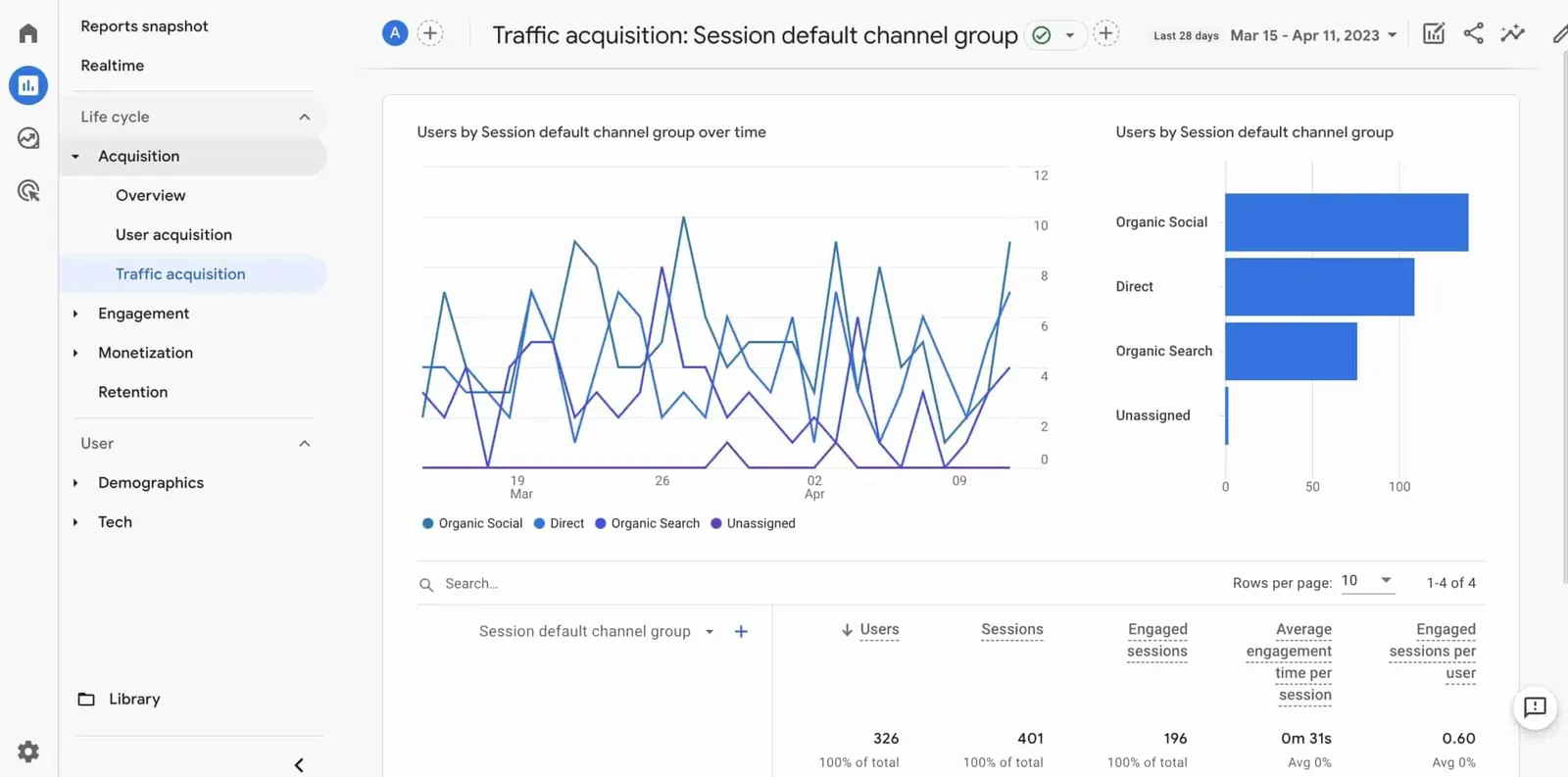
Posting and engaging are only part of the social media management equation; knowing how well those efforts perform is equally important. Reporting and analytics in social media management refer to the practice of tracking performance metrics and extracting insights to guide decision-making. Here’s what that entails and why it matters:
Key Metrics to Track: There are a variety of metrics (sometimes called KPIs – Key Performance Indicators) you can monitor, depending on your goals:
Follower Growth: How your audience size is increasing (or decreasing) over time on each platform.
Engagement: This includes likes, comments, shares, retweets, saves — any action people take on your content. Engagement rate (engagements divided by impressions or followers) is a good indicator of how well your content resonates with your audience.
Reach and Impressions: Reach is the number of unique people who saw your post, while impressions are the total number of times your content was displayed (including multiple views by the same person). These metrics tell you how broadly your message is spreading.
Click-Throughs: If you’re sharing links (to your website, blog, products, etc.), you’ll want to track how many people click those links. This is crucial if one of your goals is driving traffic or conversions through social media.
Conversion Metrics: These are deeper funnel metrics – for example, how many people filled out a form, made a purchase, or completed some desired action after coming from social media. Tracking conversions often requires integrating your social data with Google Analytics or using tracking pixels (like the Facebook Pixel) on your website. This helps attribute outcomes (like sales or sign-ups) back to your social posts or ads.
Response Rate and Time: For customer service aspects, you might track how quickly you respond to messages on social media and what percentage of messages/comments you respond to. Some platforms actually show this publicly (Facebook pages often display an “typically responds within X hours” note).
Sentiment and Brand Mentions: A more qualitative metric, but tools can gauge the sentiment (positive, neutral, negative tone) of comments and mentions your brand receives. It’s one thing to get 100 mentions, but knowing if most of them were praise or complaints is important for context.
Using Analytics Tools: Each social media platform provides its own analytics (like Facebook Insights, Twitter Analytics, Instagram Insights, LinkedIn Analytics, etc.), which are very useful. However, using a management tool as discussed can aggregate these into one view. Whichever method you use, it’s important to regularly review the data. For example, at month-end you might look at a report that shows how all your posts did, side by side. Some tools will even generate nice PDF reports or visual dashboards you can share with your team or boss.
Why It Matters: Without analytics, you’re essentially flying blind. Regular reporting helps you answer questions like:
Are we achieving our goals? (e.g., Did we hit our follower growth target? Are we getting more website traffic as planned?)
What content works best? (e.g., Do our video posts get the most shares? Does posting in the evening yield better engagement than morning? Which campaign hashtag got the most traction?)
Where should we adjust? (e.g., If one platform is lagging far behind in engagement, maybe you need a different approach there or even to question if that platform is worth the effort. If certain topics get a lot of positive feedback, perhaps you create more content around those.)
What’s the ROI of our social media? Especially for decision-makers, understanding the return on investment is crucial. If you can report, for example, that “In Q1, social media brought in 5,000 visitors who made purchases totaling $50,000 in revenue,” that’s a powerful justification for why social media management is worth it. Or you might report non-monetary ROI, like “social media increased our brand mentions by 30%, indicating growing awareness.”
Refining Your Strategy: The ultimate purpose of analytics isn’t just to collect numbers, but to improve your strategy. Social media is dynamic, and analytics allow you to be data-driven in how you adapt. Maybe your reports show that one platform vastly outperforms another for your business — you might decide to dedicate more resources to the one that works better. Or you find that posts with questions in the caption get more comments — you could incorporate more of that style. Treat each report as a learning opportunity to make your next month or campaign better.
Reporting to Others: If you’re managing social media for a company or client, you’ll likely need to present results to others. A clear, concise report (often monthly or quarterly) is valuable. Highlight key metrics and explain them in plain language. For example, instead of just saying “Engagement rate was 5%,” you might add “...which is a 2% increase from last month, likely due to the new content series we introduced on Tuesdays.” Always tie the numbers back to insights or actions (“this is what we’ll do next based on these results”).
Staying Updated: Finally, keep in mind that analytics aren’t static. Platforms sometimes introduce new metrics or change how they calculate things. As a social media manager, part of your role is staying informed about these changes. Also, consider benchmarking your performance against industry standards or past performance (year-over-year comparison, for instance) to get a sense of context.
In summary, reporting and analytics turn raw social media data into actionable intelligence. They show you the impact of your work and help you continuously refine your approach for better results. Don’t worry if you’re not a “numbers person” — most analytics tools present data in user-friendly ways (charts, highlights, etc.). Over time you’ll get more comfortable interpreting these metrics. The key is to regularly take the time to review and reflect on them.
Automation and Scheduling in Social Media Management
One of the biggest challenges in social media management is staying consistent and timely with your content without it consuming all of your time. This is where automation and scheduling come into play. These techniques help you maintain an active social presence in an efficient way. Let’s break down what this means and how to use them wisely:
Scheduling Content: As mentioned earlier, scheduling is the practice of preparing your posts ahead of time and using tools to publish them automatically at the times you choose. Instead of interrupting your day to hit “Post” at 3 p.m. (or worrying about posting on weekends or holidays), you can schedule everything in advance. For example, you might spend Monday morning scheduling posts for the entire week across all your platforms. The benefits of scheduling are huge:
Consistency: Your accounts will consistently have fresh content, even on days when you’re busy with other work or out of the office.
Optimal Timing: You can target the best times to post for engagement (many tools even suggest optimal times based on when your followers are most active). This might be times of day or specific days of the week that get better results.
Global Reach: If you have an audience in different time zones, scheduling allows you to post at times that make sense for them too, without having to wake up at odd hours.
Batch Work Efficiency: By creating and scheduling content in batches, you often work more efficiently than doing it piecemeal every day. It puts you in a focused creative mode for content, then you can switch to other tasks.
Automation of Tasks: Automation goes beyond just scheduling posts. It can include things like:
Auto-Responses: Some platforms or tools allow an automatic reply to certain messages. For instance, a Facebook page might have an instant reply that says “Thanks for reaching out, we’ll get back to you soon!” to acknowledge a message was received. Twitter allows auto-DMs to new followers (though use this sparingly to not seem spammy).
Chatbots: Especially on platforms like Facebook Messenger or WhatsApp, businesses use chatbot automation to handle frequently asked questions or take customers through a predefined flow (like appointment booking or product ordering) without human intervention. This can greatly scale your ability to handle inquiries, though setting it up requires some planning.
Content Curation: There are tools that can auto-suggest or even auto-post content from RSS feeds or predefined sources. For example, an app might automatically share a relevant news article once a day from selected websites. This can keep your feed active with minimal effort, but you have to ensure the content aligns with your brand and is high-quality.
Recycling Evergreen Content: Automation can help re-post your best performing or timeless content. Suppose you have a great blog post that’s always relevant — a tool might automatically share that link again every few weeks to reach new followers who missed it earlier.
Social Listening Alerts: Instead of manually searching, you can set up automated alerts (via email or notifications) whenever your brand is mentioned or certain keywords pop up on social media. This ensures you don’t miss important conversations and you’re prompted to engage when it matters.
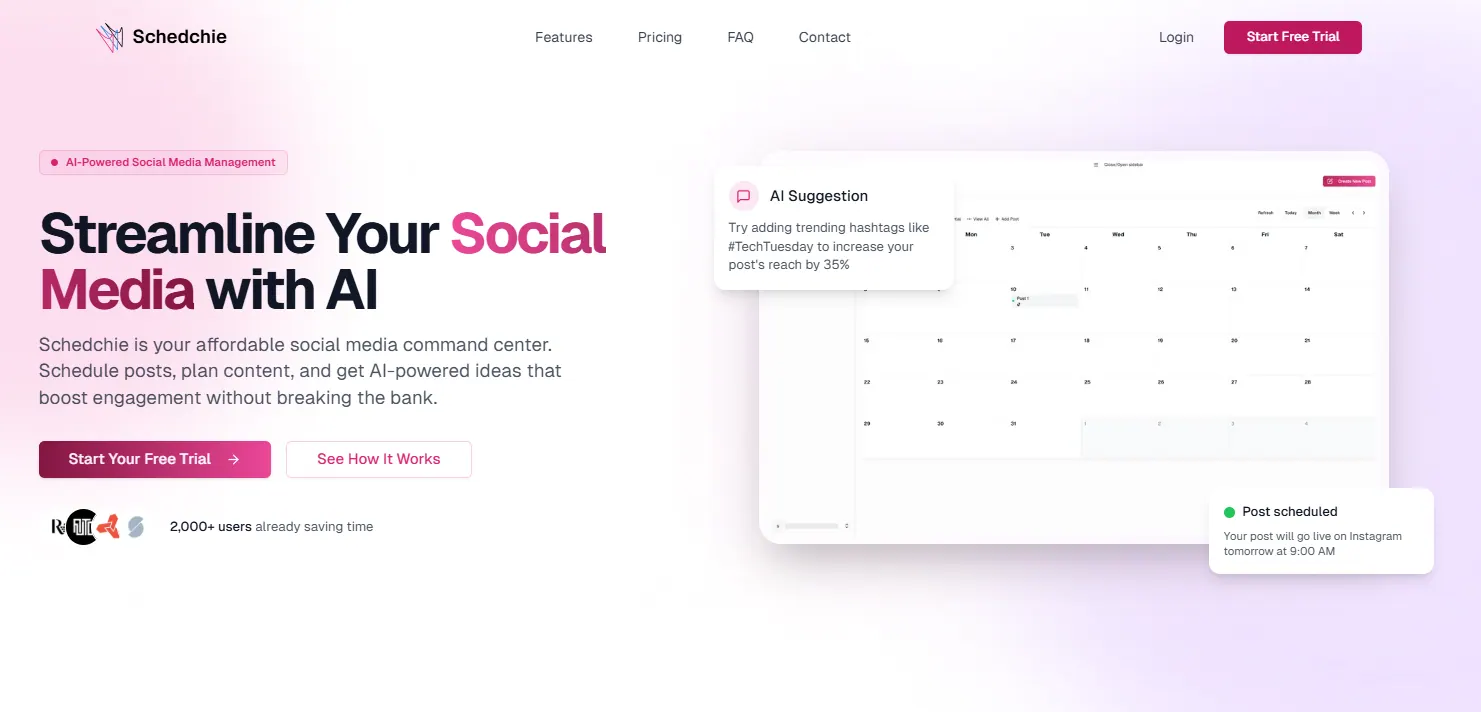
Introducing Tools (and Schedchie): Many of the management tools we discussed have automation features built-in. For example, some tools will automatically pick the next available time slot in your content calendar when you add a new post (making scheduling foolproof), or can auto-tag and sort incoming messages. Schedchie, introduced earlier, is one such tool that emphasizes easy scheduling and automation. It’s designed to let you schedule unlimited posts across all your accounts, meaning you can plan far ahead without hitting caps. It also connects to the AI assistant you already use — ChatGPT, Claude, Cursor and others — over MCP, so you can add, reschedule and review posts by asking for them in plain language. While Schedchie is one example (particularly noted for being affordable and user-friendly), many tools in this space are embracing automation to help marketers do more with less manual effort.
Staying Authentic: One caution with automation: it’s possible to over-automate and risk sounding like a robot. Social media is about human connection. So while you automate routine tasks, keep an eye on your content’s authenticity. For instance, avoid setting up automated comments or likes (some services offer this, but it can come off as spammy or inauthentic). And always be ready to step in personally for genuine interactions, especially when responding to customers. Automation should assist you, not completely replace the human element.
Benefits of Automation: When done right, automation ensures that no matter how busy you get, your social media doesn’t go dark. It frees up your time so you can focus on higher-level strategy or creative work rather than repetitive tasks. It can also increase your effectiveness — for example, consistently posting at the best times can improve engagement compared to sporadic, irregular posting. Moreover, automation can help maintain quality control (scheduled content can be reviewed before it goes live, so you’re less likely to have typos or mistakes that might happen when hurriedly posting on the fly).
Examples of Automation in Action:
A small business owner uses a scheduling tool to line up one post every morning and one in the evening on their Instagram and Facebook, ensuring two posts a day without fail.
A marketing manager sets up a chatbot on Twitter that provides quick answers (store hours, support contact info, etc.) whenever someone DMs the company, which reduces their simple inquiry volume.
A blogger uses an automation service to automatically share any new blog article to all her social profiles as soon as it’s published, without having to manually do it each time.
A support team gets automatic alerts whenever a negative comment or low-star review is posted on social, allowing them to address issues immediately.
By leveraging scheduling and automation, even a small team — or a single individual — can manage a robust social media presence that feels active and responsive around the clock. The key is to find the right balance: automate what makes sense (to save time and maintain consistency), but continue to personally engage and add that human touch which truly connects with your audience.
Final Thoughts: Social media management may sound complex at first, but with a solid strategy and the smart use of tools and automation, it becomes very manageable — even fun. You’ll be able to concentrate more on creating great content and building relationships, and less on the tedious logistics. Over time, as you analyze your results and refine your tactics, you’ll see your social media efforts translate into real benefits for your business.
Frequently Asked Questions About Social Media Management
What is social media management in simple terms?
Social media management is the ongoing work of running a brand’s social media presence: planning and creating posts, scheduling them, replying to comments and messages, and measuring what works. It can be done by a dedicated manager, an agency, or a business owner using a management tool.
What does a social media manager actually do day to day?
A typical day mixes content creation (writing captions, preparing images or video), scheduling posts in a content calendar, responding to comments and DMs, monitoring brand mentions, and checking analytics. Most managers batch these tasks — for example, scheduling a full week of posts in one sitting and setting fixed times for community engagement.
How much does social media management cost in 2026?
Doing it yourself with a management tool costs anywhere from €7.99/month (Schedchie, unlimited accounts and posts) to $99+/month per user for enterprise suites like Hootsuite or Sprout Social. Hiring a freelance social media manager typically runs a few hundred to a few thousand euros per month depending on scope, and agencies charge more. Most small businesses start with a tool and a few focused hours per week.
What is the best social media management tool in 2026?
There is no single best tool — it depends on how many accounts you run and what you need. For unlimited accounts and posts on a budget, Schedchie (€7.99/month flat) is the strongest value. For one or two channels, Buffer’s $5-per-channel plan is solid. For analytics depth, Metricool; for visual Instagram planning, Later or Pallyy; for large teams with approval workflows, Sprout Social or Hootsuite. If the 30-posts-per-profile cap is what sent you looking, read Schedchie vs Later first.
Can I manage all my social media accounts in one place?
Yes — that is exactly what social media management tools are for. A good tool connects Instagram, TikTok, Facebook, LinkedIn, X (Twitter), Pinterest, YouTube, Threads, and Bluesky into one dashboard where you schedule everything from a single calendar. Watch the pricing model though: tools that charge per connected channel get expensive as you add accounts.
Is social media management free?
You can post natively on every platform for free, and several tools have free tiers (Buffer: 3 channels with 10 queued posts each; Metricool and Zoho Social: one brand). But free tiers are designed to be outgrown — once you manage multiple accounts or need consistent scheduling, expect to pay at least €5–10/month.
Do I still need a social media scheduler if AI can write my posts?
AI helps with the writing, but it doesn’t publish, time, or coordinate posts across platforms — that’s the scheduler’s job, and the two work best together. Buffer and Metricool build AI assistance into the scheduling workflow. Schedchie goes the other way: it connects to the AI assistant you already use over MCP, so drafting happens in your assistant and scheduling happens in Schedchie.
Try it: Schedchie handles the scheduling half of social media management for €7.99 a month flat — unlimited accounts, unlimited posts, twelve platforms, one calendar. Start the 14-day free trial, or see how the €24.99 Team plan handles approvals and client review links.