


In 2025, managing social media on a tight budget means choosing tools that fit your specific needs – without paying for features you won’t use. Here’s a practical guide to picking an affordable social media scheduler. We’ll walk through key considerations and cost-saving tips, so you can keep your feeds active while staying within budget.
1. Assess Your Needs First
Identify your goals and volume. Ask yourself how many platforms you need to manage (e.g., Facebook, Instagram, X/Twitter, TikTok) and how often you post. If you run just one or two accounts and post few times a week, even a free tool might suffice. But if you have multiple profiles or plan daily posts, look for “unlimited” plans or high quotas. For example, Schedchie offers unlimited scheduling across all platforms for about $8/month, which is ideal if you manage several channels or post frequently. By contrast, Buffer’s free plan caps your posts (10 per profile) – sufficient for starters, but its paid plan ($6 per profile) is needed for heavy uses.
Consider your team size and workflow. Are you a solo entrepreneur, or do you have a team (even of 2–3 people)? If it’s just you, you can ignore bulky collaboration features and focus on simple schedulers. Many budget tools are designed for one user. If you occasionally need approvals or shared calendars, some low-cost platforms offer basic team features without a large price jump (e.g., Social Champ’s higher tier lets you add team members for under $10/profile).
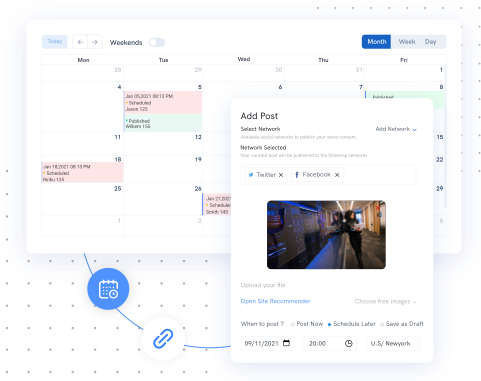
Think about necessary features. A basic scheduler should let you queue posts on multiple networks with a calendar view. Other helpful features might include:
Bulk scheduling: Upload dozens of posts in one go to save time.
Content recycling: Automatically re-post evergreen content on a schedule.
AI assistance: Automated caption or hashtag suggestions can be a time-saver.
Analytics: Even basic engagement metrics can help you refine strategy.
Write down the top 3–5 capabilities you truly need. For example, if fresh ideas are hard to come by, an AI-powered assistant could be worth extra (e.g., Schedchie’s AI schedchie.com). If analytics aren’t crucial, you can save money by skipping advanced reporting tools.
2. Compare Free Plans vs. Paid Tiers
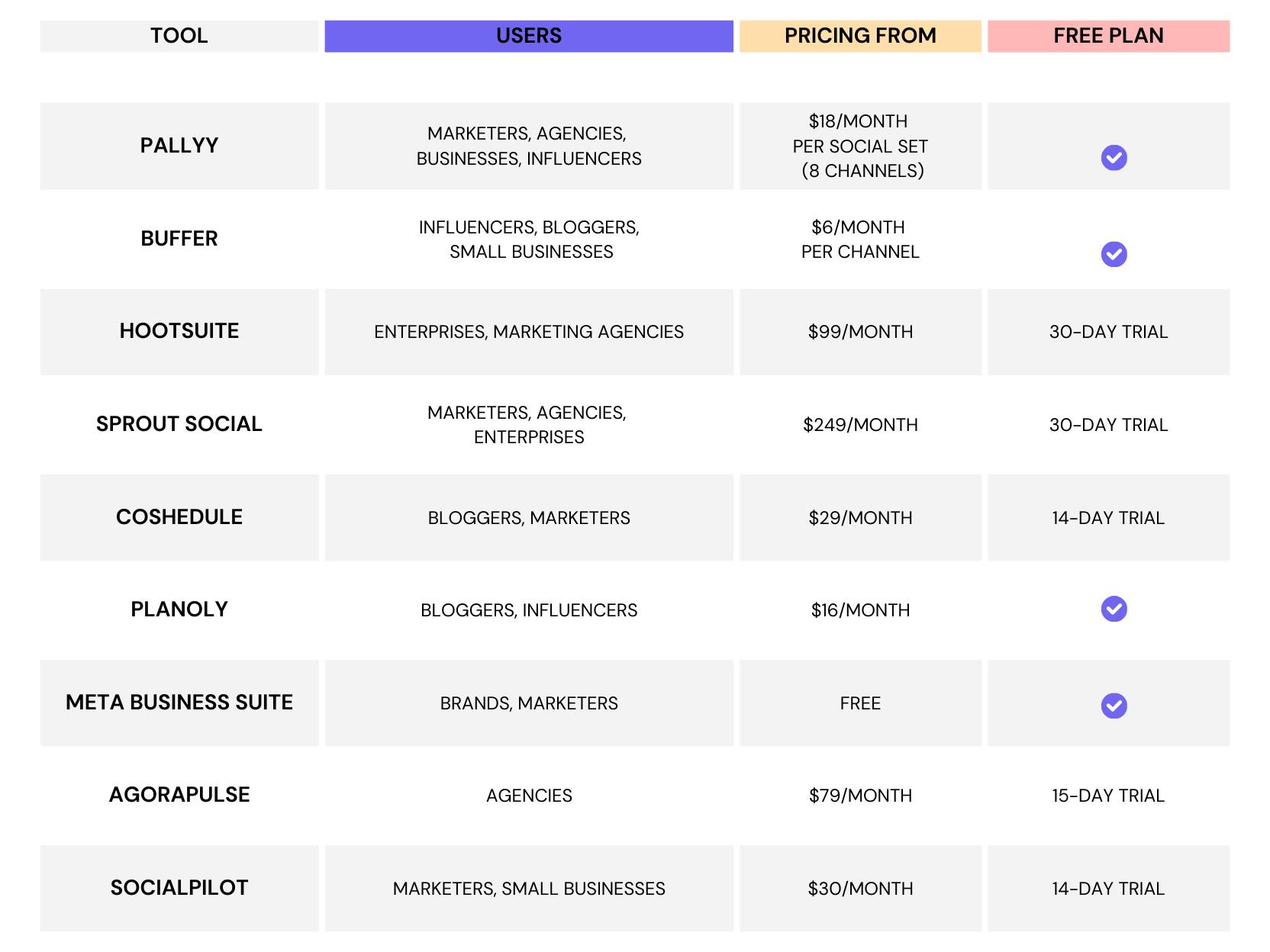
Leverage free plans initially. Many scheduling tools offer a free tier or trial. Start by testing those to see if they meet your needs. For instance, Buffer’s free plan allows three profiles with up to 10 scheduled posts each; Pallyy’s free plan gives 15 posts across one set of accounts; Zoho Social even has a free tier with unlimited posts for one brand (across several networks). These can be very useful if your posting volume is low.
Understand the upgrade path. If a free plan feels limiting, look at the entry paid options. Often, low-cost tools charge either per-profile or as a flat monthly fee. For example:
Per-profile pricing: Social Champ charges roughly $5 per profile with no post limits. So if you have 2 profiles, that’s ~$10/month.
Flat-fee pricing: Schedchie charges one flat rate (~$8) for unlimited profiles and posts, which can be cheaper if you have multiple accounts.
Pay-as-you-grow: Buffer and Pallyy charge per set or per extra seat (Buffer is $6 per extra profile, Pallyy’s “social sets” are $15 each).
Think about your future growth. If you expect to add more channels, a flat-rate tool like Schedchie or a plan like Zoho Social’s (one brand/user but unlimited posts) may end up saving you money. If you only have one or two channels, per-profile pricing can be economical at first.
3. Prioritize Unlimited Scheduling and Multi-Account Support
The cheapest tools tend to distinguish themselves on post limits and account limits. Ideally, find a solution with as high or unlimited quotas as possible. A scheduler that forces you to buy extra every time you add an account can become expensive quickly.
Unlimited posts: Some affordable tools advertise unlimited queuing once you’re on a paid plan. Schedchie explicitly offers unlimited scheduling for a single low price. Radaar’s basic plan ($9.99/mo) lets you queue up to ~90 posts on 3 profiles – practically “unlimited” for many small users. Social Champ’s paid plans allow unlimited posting per profile.
Unlimited profiles: Few budget tools give truly unlimited profiles on a cheap plan. Zoho Social (paid tiers) and Schedchie let you connect all your accounts. If you anticipate dozens of profiles, this could be a priority. Otherwise, compare how many profiles the entry plans include. Buffer’s free tier is only 3 profiles, and each extra costs more.
Remember, “unlimited” often comes with fair-use policies, but these entry-level unlimited offers are usually generous enough for a small business or freelancer.
4. Factor in Helpful Extras (AI, Analytics, Automation)
When budgets are tight, you can still look for tools that give extra value:
AI content tools: Modern schedulers sometimes include AI features. For example, Schedchie has a built-in AI assistant that can craft captions or brainstorm post ideas. Pallyy’s paid plan also includes an AI caption generator. These features save time, effectively stretching your budget by doing double duty (content ideas + scheduling in one tool). If you find writing posts tedious, an affordable AI-enabled scheduler might boost your productivity enough to justify its cost.
Automation: Look for bulk posting and recycling features. Publer (another budget app) and Social Champ allow auto-reposting of high-performing content or scheduling posts at “optimal times” automatically. Even Buffer offers bulk upload of CSV files. These tools let you get more mileage out of fewer posts, meaning fewer hours spent.
Basic analytics: You don’t need enterprise-level reports, but even simple metrics can help. Platforms like Metricool (cheap plans from ~$10) or Social Champ include basic engagement stats. Having some data helps you focus your effort on what works.

5. Read Reviews and Try Before You Buy
Finally, learn from others. Check user reviews or forums to see real feedback. For instance, one user comment on Reddit notes that Schedchie “works great for me” as an affordable scheduler with AI for $8/momnth. Another notes Buffer’s reliability and straightforward analytics. Use these insights to confirm the tools behave as advertised.
Always test-drive first: Most tools offer free trials or money-back guarantees. Sign up and try to schedule as you would in real life. Does the interface make sense? Can you schedule the number of posts you need? Are reminders or cross-platform publishing working? After a week of testing, you’ll know if a tool feels right.
By matching the tool’s limits to your needs (and possibly combining a free plan with occasional manual posts on another platform, if necessary), you can achieve a cheap social media workflow. In many cases, using a dedicated scheduler like Schedchie or Buffer will be far easier and cheaper in the long run than paying someone to post manually every day. The key is to pick the one that aligns with your posting volume and content style, then stick with it.
Once you’ve identified a few candidates, make your choice based on which offers the most of what you need for the price you can afford. With the right selection, even a tight budget can yield consistent, engaging social media presence in 2025.