

Sticking to free social media tools might sound smart when you’re on a tight budget – until the frustration kicks in. Many small business owners and freelancers start with free or freemium schedulers, only to hit painful limitations: tiny post quotas, missing features, and hours wasted juggling multiple apps. If this sounds familiar, it may be time to upgrade your toolkit. The good news is you don’t need to spend a fortune to get a social media management tool that actually works for you. This guide will walk you through common pitfalls of free plans (and why a few dollars a month on the right tool is worth it), how to identify a truly effective yet affordable platform, and what to consider to make the best choice for your needs.

When “Free” Falls Short: The Hidden Costs of Free Social Media Tools
At first glance, free social media scheduling tools seem like a lifesaver for a lean budget. However, users often discover that “free” comes with trade-offs that can hinder your social media strategy – or even cost you more in the long run. Here are some common frustrations people encounter with free or freemium social media management solutions:
Severe Limits on Scheduling: Most free plans impose low caps on how many posts you can queue up. For example, you might only be allowed 10 scheduled posts per social account (as is the case with Buffer’s free tier). If you try to plan content more than a week or two out, you’ll quickly hit that wall. This means extra time spent constantly checking and refilling your queue. Some platforms advertise “unlimited scheduling” but then bury a 10 or 15 post total limit in the fine print. It’s easy to invest hours setting up your posts, only to realize half of them won’t publish until you upgrade.
Limited Accounts and Platforms: Free plans often restrict the number of social profiles you can connect – typically one to three accounts maximum. If you’re managing a presence across Facebook, Instagram, Twitter, LinkedIn, etc., you might be forced to choose only a subset to automate, while handling the rest manually. Even worse, a few free tools exclude certain major platforms or content formats. (For instance, one scheduler’s free version might support Instagram feed posts but not Reels or TikTok videos.) This piecemeal coverage can really fragment your workflow.
Feature Gaps and Lack of Automation: The feature set of free tools is usually pared down. You might not get analytics beyond the most basic likes and shares count. You likely won’t see advanced features like content recycling, bulk uploading, or a social inbox for replying to messages – those are typically premium-only. Free tools also rarely incorporate newer helpful features such as AI content assistance. This means you miss out on efficiency boosters like automatically generating hashtag suggestions or scheduling the first comment on Instagram posts. Over time, these missing features can stunt your social media growth (or at least make you spend more time doing things manually).
No Team Collaboration or Support: If you have a small team, free plans usually limit you to one user. There’s no workflow for approvals or collaboration – everyone might be sharing one login, which is not ideal or secure. Additionally, free users often get little to no customer support. When something goes wrong (e.g., a post fails to publish), you’re on your own to troubleshoot with help docs or forums. The hours lost resolving issues could be better spent on your business.
Constant Upgrade Pressure: Let’s face it – freemium tools exist to upsell you eventually. Some free plans are so bare-bones that they function more as prolonged trials. You might start encountering pop-ups or email reminders nudging you to upgrade when you hit those limits. The psychological effect can be stress or guilt for using a free service, which isn’t a great user experience. In the worst cases, companies discontinue their free tier entirely (as happened with Hootsuite’s free plan), leaving users scrambling for an alternative last-minute.
In short, while free scheduling tools can be a helpful short-term solution, their constraints often become pain points just as your social media efforts start gaining traction. The real cost of “free” is the time and opportunities you lose dealing with workarounds – or the inconsistency in posting when you forget to manually fill gaps that the tool wouldn’t cover.

Why a Small Investment Yields Big Returns
Graduating from a free plan to a low-cost paid tool can feel like a leap, especially when every dollar counts. But consider what even an extra $5 to $15 a month can get you in terms of time saved and results gained:
No More Post Quotas: Most affordable paid plans remove those pesky scheduling caps. For example, Schedchie – an extremely budget-friendly option at around $8/month – offers unlimited scheduling across all your connected accounts. This means you can plan content for the next month (or even quarter) in one go, then spend your reclaimed time on content creation or engagement rather than babysitting your queue. The freedom to load up as many posts as you need is a game-changer for consistency.
All Your Accounts, One Dashboard: Low-cost tools often allow multiple social accounts on their entry plans. Instead of logging into three different free tools (one for Twitter, one for Instagram, one for Facebook) or managing some platforms manually, you can consolidate everything. For instance, a single tool like Social Champ or Radaar in their basic paid tier can let you manage 3+ profiles in one place. This not only saves time, but ensures you don’t neglect any channel due to inconvenience.
Advanced Features = Better Results: When you pay even a little, you unlock features that amplify your impact. Analytics on a paid plan will typically show you what content and timing works best, so you can refine your strategy (something free tools seldom provide in depth). Features like content recycling or bulk scheduling mean you can repurpose popular posts and schedule an entire campaign quickly. Some affordable tools have neat extras, too – for example, the $9.99/month Radaar includes a social inbox and keyword monitoring, letting you engage with your audience and track brand mentions seamlessly. These capabilities help you grow your presence more effectively than you could with a no-frills scheduler.
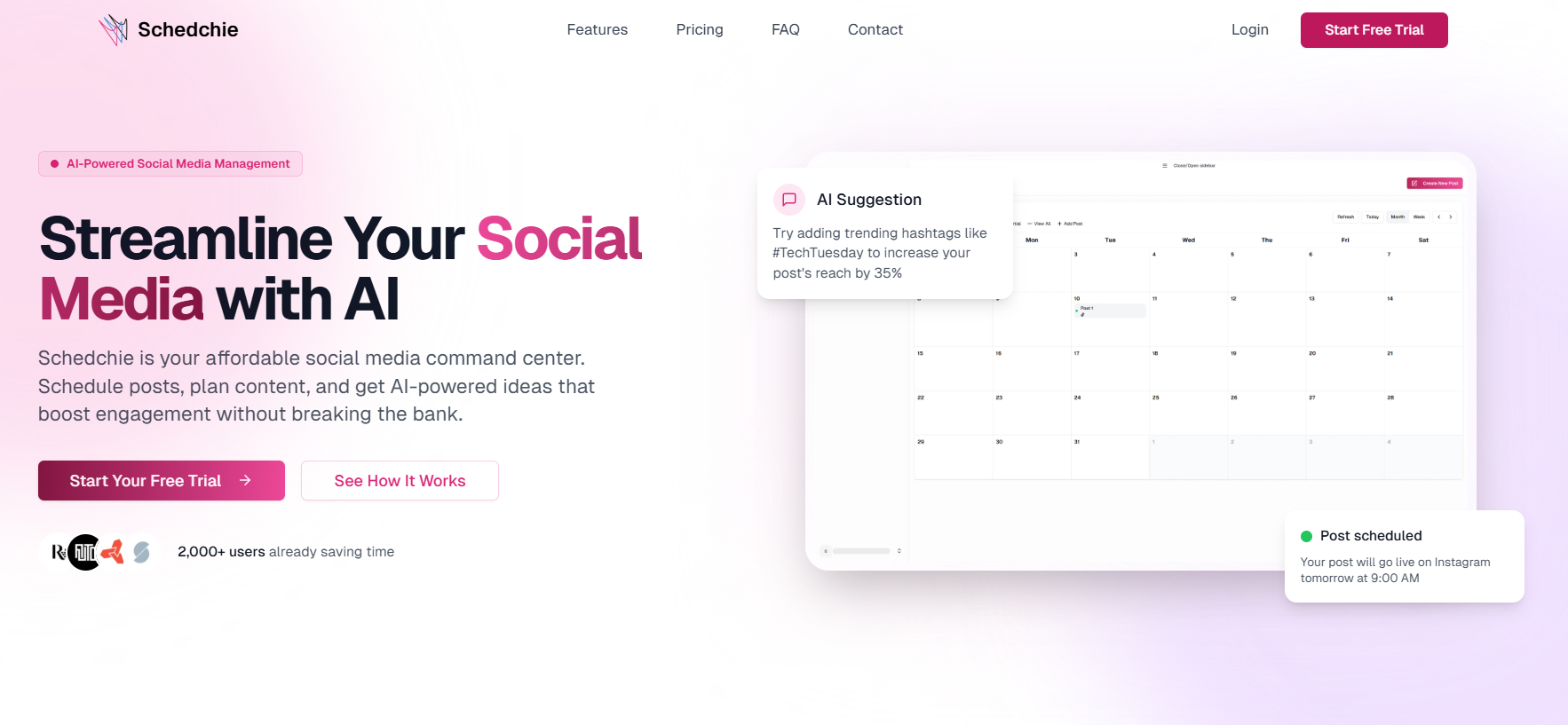
Helpful AI and Automation: 2025 has seen many social tools integrate AI to assist users – but such features are rarely offered free. By moving to a paid plan, you can tap into tools that have AI writers or suggestion bots. For example, Schedchie’s inexpensive plan comes with an AI assistant that can draft captions or suggest trending hashtags for you. Likewise, Buffer’s paid plan enables AI-generated ideas to spark your creativity. These AI boosts can significantly cut down the time you spend brainstorming content, which for a small business owner, is priceless time returned to other tasks.
Reliability and Support: When you’re a paying customer (even at a low tier), you generally get better reliability and support. Paid plans usually have guaranteed uptime, and if an issue arises, you can reach out to customer service for help. This safety net can reduce a lot of stress. You’re less likely to encounter unpleasant surprises like suddenly losing access to a feature or having posts fail without explanation. Essentially, you’re paying for peace of mind that the tool will do its job when you need it to.
Most importantly, investing in a low-cost social media tool is an investment in your own time and consistency. Instead of being the person who forgets to post for days because the free tool let the queue run dry, you become the person who always has a month’s content ready to roll. That consistency can translate into better follower engagement and growth – which has real monetary value for your business. A $10/month tool paying off in even one extra sale or client contact per month has justified itself. The bottom line: a little budget toward the right tool can vastly improve your social media efficiency and outcomes, making it one of the highest-ROI expenses in your marketing plan.

How to Choose the Right Affordable Tool: Key Factors
Once you’ve decided to take the leap into paid tools (without going overboard on cost), the next step is choosing the right one. Not all budget-friendly platforms are created equal – you’ll want a tool that actually solves the problems you had with free versions, rather than just charging you for a slight upgrade. Here’s how to evaluate and compare low-cost social media management tools:
Assess Your Platform Needs: Make a list of all the social networks you actively use or plan to use. Ensure the tool you choose supports all of them. A good affordable tool should at least cover Facebook, Instagram, Twitter (X), and LinkedIn. Many also include Pinterest, TikTok, or YouTube. If a tool is missing one of your key platforms (for example, some don’t do TikTok or Threads yet), that’s a mark against it. Also consider content types – do you need Instagram Stories or Reels scheduling? Pick a tool that won’t box you out of any channels or formats that matter to you.
Check Scheduling Limits and Flexibility: The whole point of upgrading is to get rid of tight limits, so scrutinize each tool’s posting allowances. The best low-cost options will offer unlimited posts or a very high cap that you’ll never realistically hit. Also note how many social accounts are included in the base price. Some tools, like Buffer or Social Pilot, charge per social profile – which can be fine if you only have a couple, but could get costly if you manage many. Others, like Schedchie, allow unlimited profiles for one flat fee. Choose the model that fits your situation. If you anticipate adding more social accounts as you grow, a flat unlimited-account plan can save you significant money long-term.
Look for Efficiency-Boosting Features: Consider which features will actually make your workflow easier or improve your content. Do you want an integrated content calendar view for planning at a glance? What about a media library to reuse images/videos easily? If you collaborate with others, is there a way to have multiple users or approval workflows? Prioritize features like bulk upload, content recycling (evergreen reposting), category queues, and yes, AI assistance for writing captions or generating ideas. These are not gimmicks – they can free up hours of work. For example, an AI caption generator can turn a bullet point you provide into a polished post, sparing you the writing effort. Make sure the tool’s feature set aligns with your work style. If you love analytics, pick one with robust reporting; if you struggle with ideation, pick one with AI or content suggestions.
Ease of Use and Learning Curve: A tool isn’t truly “effective” if it’s so complicated that you avoid using it. Many all-in-one social suites can be overwhelming; the last thing you need is to pay for a product that confuses you more than it helps. Take advantage of free trials or demos – most platforms offer a 7-14 day trial of their paid version. Test out the interface. Is it intuitive to schedule a post, view your calendar, and find key features? Affordable tools like Pallyy, for instance, pride themselves on a clean design specifically so non-experts can jump right in. Read user reviews regarding usability. In general, look for a streamlined, clutter-free interface if you’re not a social media tech guru. You want to spend your time executing your strategy, not digging through menus.
Scalability and Pricing Transparency: Finally, ensure the tool can grow with you just enough. We’re focusing on low-cost solutions, but with any luck, your business and social presence will expand over time. Is there a mid-tier plan you could upgrade to if needed, and is it still reasonably priced? The goal is not to jump to enterprise-level software, but you also don’t want to hit a ceiling too soon. Check if the provider has intermediate plans and what they cost. Also, watch out for any hidden fees or upsells. Reputable affordable tools will be clear about “you get X profiles and Y features for $ per month” on their pricing page. If a pricing scheme looks confusing or nickel-and-dime (e.g., extra charge for each additional team member, or necessary features locked behind add-ons), you may want to steer clear. Opt for a service with straightforward pricing that fits your budget now and has a path for moderate growth.
By evaluating potential tools with these factors in mind, you’ll be equipped to pick a solution that addresses the exact issues you’ve faced with free tools. Remember, the “best” low-cost tool is the one that closes the gaps in your social media process. For one person that might be unlimited scheduling and an AI caption writer; for another it might be multi-platform support and a solid mobile app. Know your priorities, and you’ll find your match.

Affordable Tools That Get the Job Done (Examples)
To put the above advice into context, let’s briefly look at a few examples of budget-friendly social media management tools that have a strong reputation. These are the kinds of solutions you’d encounter as you research, and each illustrates what “better value” looks like in practice:
Schedchie: As mentioned earlier, Schedchie is a poster child for low-cost efficiency. For about the price of two lattes a month, it grants unlimited scheduling across all your socials and throws in an AI assistant to boot. It’s a no-frills, results-focused platform – ideal if you felt held back by posting limits or by hopping between multiple free apps. Schedchie’s value is especially clear for users managing several accounts or those who want AI help generating content ideas without paying enterprise prices.
Buffer (Essentials Paid Plan): If you liked Buffer’s simplicity but not its free limitations, their $6-per-channel Essentials plan is a straightforward upgrade. For example, suppose you only use Facebook and Instagram; for about $12 monthly, you get unlimited posts on both, plus features like analytics and Instagram first-comment scheduling. Buffer’s paid tier keeps the interface you’re comfortable with while removing the friction points of the free version. It’s a solid choice for those with just a couple of primary social accounts who want to stick with a familiar, minimalist tool.
Social Champ (Starter/Growth): Social Champ offers a compelling balance of price and features, particularly if you require capabilities beyond just scheduling. For roughly $5–$10 a month (per social profile connected), you get extras like a social inbox, visual calendar, bulk scheduling, and even integration with Canva and AI tools. The perk here is customization: you can pay exactly for the number of profiles you need and still enjoy advanced functionality. Social Champ is a great example of a scalable solution – it starts cheap for a few accounts, and if you later manage more profiles, you can add them without having to jump to an exorbitant plan.
Pallyy (Premium): Pallyy’s premium plan (~$15/month for one full social set) is tailor-made for content creators and small brands especially active on Instagram or TikTok. It includes unlimited scheduling, an Instagram grid preview (so you can perfect the look of your feed in advance), and cross-platform support. It also has an easy-to-use interface which means less time learning and more time scheduling. Pallyy demonstrates that even niche needs (like visual planning) can be met affordably. It’s a reminder to seek out a tool that aligns well with your specific social focus – often there’s an affordable option built with your use-case in mind.
There are certainly other notable mentions (such as Publer, Radaar, or SocialPilot’s lower tiers) that deliver fantastic value for their cost. The key takeaway is that you have options. Gone are the days when upgrading meant shelling out $99+ a month for enterprise-level software. In 2025, the market of “prosumer” social media tools is rich with competition, which benefits you as the consumer. You can be picky and find a tool that checks all your boxes at a price point in the single or low double-digits per month. The examples above are proof that with a bit of research, you can avoid the pitfalls of free tools without overspending.
Final Thoughts: Smart Spending for Long-Term Social Success
Choosing a low-cost social media management tool is ultimately about investing wisely in your business’s future. The right tool will free up your time, help you maintain a consistent posting schedule, and provide insights to refine your marketing – all essential ingredients for growth. And it will do so at a cost that’s a blip on your balance sheet.
If you’ve been feeling the strain of juggling multiple free tools or constantly bumping against their limits, take it as a sign that your time and sanity are worth more than the few dollars you’re saving. Transitioning to a paid platform might feel like removing training wheels: a bit daunting at first, but ultimately liberating. You’ll likely wonder why you didn’t do it sooner.
To recap, start by pinpointing what you need most that free solutions aren’t giving you – be it unlimited scheduling, multi-platform coverage, better analytics, or anything else. Use those criteria to evaluate affordable tools, test a couple out, and don’t be afraid to commit to the one that fits. Many of these services have month-to-month plans, so you’re not locked in long term if things change.
By securing a capable yet low-cost social media management tool now, you set yourself up for smoother, more effective social media operations in the long run. You’ll be able to focus on crafting great content and engaging with your audience, rather than wrestling with platform limitations. In other words, you’ll be spending less time on the mechanics of posting and more time reaping the benefits of a strong social media presence – building your brand, attracting customers, and growing your venture. That’s money well spent.